'Tony Unger Nov 2007
'if you have questions, i may or may not be able to answer them
'This script returns all the groups with their members in this format
'"Group,Display name,Account Name,Group Scope,Group Type"
'I did it that way for easy import into excel
'Tested to work on
'2000 Mixed mode
'2000 Native Mode
'2003 Mode
'It should auto find the domain it is ran from.. if not look for strDNSDomain and fill in your information
'This was pieced together from many sources but mainly
'http://www.computerperformance.co.uk/vbscript/index.htm
'And a few others
'Use at your own risk, but i have never had an issue running this.

On Error Resume Next
Dim PathtoCSV
Dim Dil
PathtoCSV = "c:\GroupsWithUsers.csv" ' change the path here
dil = ","    'how do you want the values to be separated ?  by , ; etc
Dim objConnection, objCommand, objRootDSE, strDNSDomain
Dim strFilter, strQuery, objRecordSet, strgt
DIM fso, GuyFile ' write to text file


Set objConnection = CreateObject("ADODB.Connection")
Set objCommand = CreateObject("ADODB.Command")


objConnection.Provider = "ADsDSOOBject"
objConnection.Open "Active Directory Provider"
Set objCommand.ActiveConnection = objConnection
Set objRootDSE = GetObject("LDAP://RootDSE") 'bind the user object to Active Directory
Set fso = CreateObject("Scripting.FileSystemObject")
Set GuyFile = fso.CreateTextFile(PathtoCSV, True)

'Writes 1st line(Header) to text file
GuyFile.WriteLine("Group Name" & dil & "Display Name" & dil & "Account Name" & dil & "Group Scope" & dil &  "Group Type" & dil & "Last Password Set")

'Get domain if this doesn't work in auto finding the domain can try the commented out
strDNSDomain = objRootDSE.Get("defaultNamingContext")
'strDNSDomain = DC=microsoft,DC=com

strBase = ""

'Define the filter elements
strFilter = "(&(objectCategory=group))"

'List all attributes you will require
strAttributes = "distinguishedName,sAMAccountName,groupType"

'compose query
strQuery = strBase & ";" & strFilter & ";" & strAttributes & ";subtree"
objCommand.CommandText = strQuery
objCommand.Properties("Page Size") = 99999
objCommand.Properties("Timeout") = 300
objCommand.Properties("Cache Results") = False

Set objRecordSet = objCommand.Execute
objRecordSet.MoveFirst

Do Until objRecordSet.EOF
    strDN = objRecordSet.Fields("distinguishedName") ' returns ldap path
    strSA = objRecordSet.Fields("sAMAccountName") ' returns Group name
    strgt = objRecordSet.Fields("groupType")
    If (strgt ANd &h01) <> 0 then
        Scope = "BuiltIn Local"
    ElseIf (strgt And &h02) <> 0 Then
        Scope = "Global"
    ElseIf (strgt And &h04) <> 0 Then
        Scope = "Domain Local"
    ElseIf (strgt And &h08) <> 0 Then
        Scope = "Universal"
    End If
    If (strgt And &h80000000) <> 0 Then
        SecDst = "Security Type"
    Else
        SecDst = "Distribution Type"
    End If

    'strDN Prints ex CN=IIS_WPG,OU=IT Dept,OU=Groups,DC=XXXX,DC=com   Sweet!!!
    'Wscript.Echo  strDN

    Set objGroup = GetObject("LDAP://" & strDN & "")

    For Each objUser in objGroup.Members
    'The mid function is set to start at char 4 on the returned string of objUser.Name to not write CN= to the csv file
    'If you wanted to only write certain groups and their members to the CSV file then uncomment the line below and the end if and follow the example
    'If strSA = "Domain Admins" or strSA = "Administrators" or strSA = "Enterprise Admins"
          GuyFile.WriteLine(strSA & dil & objUser.displayName & dil & mid(objUser.Name,4) & dil & Scope & dil &  SecDst & dil & objUser.PasswordLastChanged)
    'End If
     Next
    objRecordSet.MoveNext ' moves to next member in group
Loop


GuyFile.Close
objConnection.Close
PathtoCSV = nothing
Set objConnection = Nothing
Set objCommand = Nothing
Set objRootDSE = Nothing
Set objRecordSet = Nothing
WScript.Echo "Done! CSV file saved to: " & PathtoCSV
Tuesday, November 20, 2012
VBS script - List out all domain groups with users
This is a little VBS script I pieced together back in 2007. Its purpose is to connect to Active Directory and list out all domain groups and their users into a nice CSV file. If you have proper permissions on the domain just double click and it will save a csv file to c:\groupswithusers.csv.
Purpose: List out all domain groups with users
Note: There could be an issue listing out Domain Users group that I never fixed.

Wednesday, September 12, 2012
Friday, August 31, 2012
Raspberry PI raspi-config
Command to get into raspberry pi configuration menu o wheezy
sudo raspi-config
sudo raspi-config
Tuesday, August 21, 2012
Runas Program

I wrote up a little program that is similar to my touch screen runas program just missing the buttons. Here is the source code You will need to create a couple buttons and three text boxes. txtpassword txtusername txtpath and two buttons one for running the program and one for exit.
Requires VB.net Express 2010
Imports System.Security
Imports System.ComponentModel

Public Class frmMain

    Private Sub Form1_Load(sender As System.Object, e As System.EventArgs) Handles MyBase.Load

    End Sub
    Function ConvertToSecureString(ByVal str As String)
        Dim password As New SecureString
        For Each c As Char In str.ToCharArray
            password.AppendChar(c)
        Next
        Return password
    End Function

    Private Sub Step1_UsernamesPasswords()

        Dim strUsername As String
        Dim strpassword As SecureString = ConvertToSecureString(txtpassword.Text)
        Dim strCommand As String = txtpath.Text

        ' MsgBox(strCommand)

        strUsername = txtusername.Text


        'If username = nothing display error then exit sub
        If strUsername = Nothing Then
            MsgBox("Error: Please enter a username", , "Error!")
            Exit Sub
        End If

        'the username is then set to a lowercase
        strUsername = LCase(strUsername)

        'Removes all spaces from username
        strUsername = strUsername.Replace(" ", "")


        Step2_Runas(strCommand, strUsername, strpassword)
    End Sub


    Private Sub Step2_Runas(strpathSecure As String, strusername As String, strpassword As SecureString)

        ' Process.Start(strpath, strusername, strpassword, ".")
        Dim pinfo = New System.Diagnostics.ProcessStartInfo
        Dim workingFolder = "c:"
        Dim strArguments As String = ""
        Dim intstrpathsecure As Integer = strpathSecure.Count
        Dim checkforspace
        Dim strlast3characters As String = ""
        Dim strchecklast3char As String
        Dim strErrorMsg As String

        'Checks for an argument and set strArguments if found
        For i = 0 To intstrpathsecure - 1
            strlast3characters = strlast3characters & strpathSecure.Chars(i) 'all characters
            checkforspace = strpathSecure.Chars(i) 'char that currently on

            strchecklast3char = Microsoft.VisualBasic.Right(strlast3characters, 4) ' last 4 chars.
            'This detects when "exe " and there is a space then set arguements values and strpathsecure
            If checkforspace = " " And strchecklast3char = "exe " Or checkforspace = " " And strchecklast3char = "bat " Then
                strArguments = Microsoft.VisualBasic.Mid(strpathSecure, i + 2)
                strpathSecure = Microsoft.VisualBasic.Left(strpathSecure, i)
                Exit For
            End If
        Next i

        pinfo.FileName = strpathSecure
        pinfo.WorkingDirectory = workingFolder
        pinfo.LoadUserProfile = True
        pinfo.UseShellExecute = False
        pinfo.UserName = strusername
        pinfo.Password = strpassword
        pinfo.Arguments = strArguments
        pinfo.Domain = "."

        Try


            System.Diagnostics.Process.Start(pinfo)

        Catch ex As Win32Exception
            'Error Message


            strErrorMsg = "Error: " & ex.Message.ToString & vbNewLine & _
                            "___________________________________________________________ " & vbNewLine & vbNewLine & _
                            "File Path: " & strpathSecure & vbNewLine & _
                            "Arguments: " & strArguments & vbNewLine & _
                            "Username: " & pinfo.UserName & vbNewLine & _
                            "WorkingDirectory: " & pinfo.WorkingDirectory & vbNewLine & _
                            "Time Stamp: " & TimeOfDay & " on " & Date.Today


            'Debug.Assert(False, ex.Message)


            MessageBox.Show(strErrorMsg, "Error logging in as administrator", MessageBoxButtons.OK, MessageBoxIcon.Error)

        End Try
    End Sub

    Private Sub cmdRun_Click(sender As System.Object, e As System.EventArgs) Handles cmdRun.Click
        Step1_UsernamesPasswords()


    End Sub

    Private Sub Button1_Click(sender As System.Object, e As System.EventArgs) Handles Button1.Click
        End
    End Sub
End Class
Monday, July 2, 2012
Move Sql Agent Jobs to a new server
1. Click on Jobs under SQL Server Agent
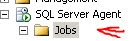
2. For 2005 click on the Summary Tab, 2008 Object Explorer Details Tab under View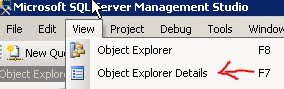
3. Select the all the jobs you wish to backup listed in the object explorer details tab
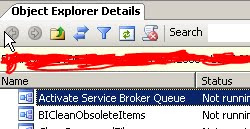
4. Right Mouse click and select Script Job As -> Create To -> File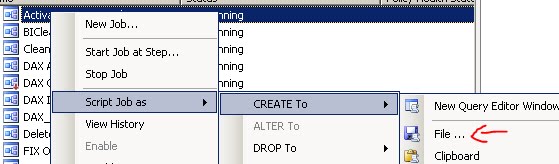
5. Save the sql file to the new server
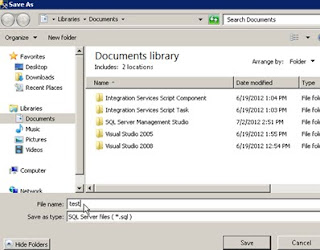
6. Execute the sql generated script on the new server and the jobs should populate
Credit to BrianBeall94706
http://www.sqlteam.com/forums/topic.asp?TOPIC_ID=99014

2. For 2005 click on the Summary Tab, 2008 Object Explorer Details Tab under View

3. Select the all the jobs you wish to backup listed in the object explorer details tab

4. Right Mouse click and select Script Job As -> Create To -> File
5. Save the sql file to the new server

6. Execute the sql generated script on the new server and the jobs should populate
Credit to BrianBeall94706
http://www.sqlteam.com/forums/topic.asp?TOPIC_ID=99014
Monday, May 7, 2012
Folder Permissions Audit
The purpose of this application is i needed a way to audit NTFS folder permissions on my file server, so instead of using one of the 3rd party programs available I wrote this one.
It contains a batch file for running the executable and a text file called exclude.txt for excluding certain user names from being added to the report. Just extract the zip to a folder and run the batch file you will be asked for the path(non-UNC at the moment)after the executable is done running the report will open in notepad. In the future I will have the report export to comma delimited format.
Note there isn't any error checking really in this application so be sure to put the correct path (ex z:\temp) When using the exclude.txt be sure to place each username on its own line. This utility only goes one level down so if you are auditing c:\temp it will only audit the top level folders within c:\temp As with any program here use at your own risk. Link to files If you would like the source code leave a comment.
It contains a batch file for running the executable and a text file called exclude.txt for excluding certain user names from being added to the report. Just extract the zip to a folder and run the batch file you will be asked for the path(non-UNC at the moment)after the executable is done running the report will open in notepad. In the future I will have the report export to comma delimited format.
Note there isn't any error checking really in this application so be sure to put the correct path (ex z:\temp) When using the exclude.txt be sure to place each username on its own line. This utility only goes one level down so if you are auditing c:\temp it will only audit the top level folders within c:\temp As with any program here use at your own risk. Link to files If you would like the source code leave a comment.
Monday, April 16, 2012
Block USB drive using solidcore
Purpose: Disable usb flash drives from loading using solidcore.
Instructions
Step 1. Log into EPO
Step 2. Create a new rule group under Application Control


Instructions
Step 1. Log into EPO
Step 2. Create a new rule group under Application Control

Step 3.
I like to name my rules starting with a . so user rules stay at the top

Step 4.
Edit the created rule

Step 5.
Click the Binary tab and add
Enter usbstor.sys as rule name and Name select Ban radio button and click ok
Click ok
Step 6. add this newly created rule to an existing policy that is being applied
Thursday, March 15, 2012
Batch delete files older then X days using forfiles : updated!
Purpose:
This batch example will search for files with the extension .txt and deletes file less then 5 days old.
Required:
----------------------------------------------------
Forfiles.exe
/p The path to search
/s Recurse into sub-folders
/M Mask
/C command The command to execute for each file
/D - dd Select files with a last modified date less than or
equal to the current date minus "dd" days. (in the past)
-----------------------------------------------------
Del.exe
-----------------------------------------------------
Code:
Echo onIf you have a space in the path the only way i found forfiles.exe to work is the following example
Forfiles /P c:\temp\ /S /M *.txt /C "cmd /c del @path" /D -5
if a file is older then 30 days in e:\example space then delete
forfiles -p "e:\example space" -m *.* -s -d -30 -c "cmd /C del @FILE"
Tuesday, February 21, 2012
Disable Solidcore
Running solidcore you may run into a problem where you have to disable it with out using epo or the local CLI
Here are the steps.
Step 1.
Boot computer into Safe Mode(Press
F5 before windows boot screen)
Step 2.
Open Registry
(Start->Run->regedit)
Step 3.
Navigate to:
[HKEY_LOCAL_MACHINE\SYSTEM\CurrentControlSet\Services\swin\Parameters]
Step 4.
Double-click DWORD RTEMode and
change value to 0
Double-click DWORD RTEModeOnReboot
and change value to 0
Reboot the computer and the agent should now be disabled.
Note:
Doing this will send out alerts to the central server.
Note:
Doing this will send out alerts to the central server.
Thursday, February 2, 2012
Excel document for pinging list of computers VBA
Here is an excel document I created that will ping a list of nodes in column A and give results in column B. There are much better tools that can be used such as angry ip scanner http://www.angryip.org/w/Home. I just wrote this as an example

Requirements:
Tested with Office 2010
Download:
Download
Monday, January 23, 2012
Howto: Two different subnets same physical LAN how to get them to talk without a gateway
Have you ever ran into a problem where you had two windows boxes that were on different sub nets on the same physical LAN and you needed to establish temporarily communication?
Say you have these two computers with the following ip addresses.
Computer 1
172.16.1.2
Computer 2
192.168.100.1
So what we are going to do is tell each computer that in order to get to the other computer they have to go out their local interface.
Open a command prompt and run each of the following commands on the respective computer.
Computer 1
route add 192.168.100.1 MASK 255.255.255.255 172.16.1.2
Computer 2
route add
172.16.1.2 MASK 255.255.255.255 192.168.100.1
This now should allow for communication to occur.
I wrote a batch file to help with adding the route command
@echo off
echo -=-=-=-=-=-=-=-=-=-=-=-=-=-=-=-=-=-=-=-=-=-=-=-=-=-=-=-=-=-=-=-=-=-=-=
Echo Created By Tony Unger
Echo **********************************************************************
echo Note:
echo Setup Routing Table
Echo Enter IP address you wish to connect to
REM IP address that was entered
set /p IPAddress=
REM Find Local IP Address - Works for Win7 if you have more then 1 adapter this may not work
REM Windows 7
FOR /F "TOKENS=2* DELIMS=:" %%A IN ('IPCONFIG ^| FIND "IPv4"') DO FOR %%B IN (%%A) DO SET LOCIPADDR=%%B
route add %IPAddress% MASK 255.255.255.255 %LOCIPADDR% /p
I wrote a batch file to help with adding the route command
@echo off
echo -=-=-=-=-=-=-=-=-=-=-=-=-=-=-=-=-=-=-=-=-=-=-=-=-=-=-=-=-=-=-=-=-=-=-=
Echo Created By Tony Unger
Echo **********************************************************************
echo Note:
echo Setup Routing Table
Echo Enter IP address you wish to connect to
REM IP address that was entered
set /p IPAddress=
REM Find Local IP Address - Works for Win7 if you have more then 1 adapter this may not work
REM Windows 7
FOR /F "TOKENS=2* DELIMS=:" %%A IN ('IPCONFIG ^| FIND "IPv4"') DO FOR %%B IN (%%A) DO SET LOCIPADDR=%%B
route add %IPAddress% MASK 255.255.255.255 %LOCIPADDR% /p
Tuesday, January 17, 2012
ATTR attributes for Solidcore 5
These are not listed in the documentation I had to get this information from development.
Attr command can be used to configured the required files to behave corresponding the solidifier.
-a Always authorized attribute
This attribute allows the user to configure a supported file as always authorized to execute.
File configured under this attribute will be allowed to execute whether solidified or not.
-b Bypassed from memory control attribute
This attribute allows user to configure a process to run bypassed from MP-mangking and MP-decoying.
This is one of the memory protection technique provided by solidifier but it is disabled by default.
-c Bypassed from Critical Address Space Protection attribute
Critical Address Space Protection is the latest and most effective memory protection technique provided by Solidifier. It is enabled by default.
-c attribute configures a process to run bypassed from MP-CASP.
-d Bypassed from process stack randomization attribute
This comes under MP-VASR which is enabled only on special request from customer.
-e Rebase dll attribute
Changing the base address of the dll.
-r Bypassed from dll relocation attribute
-d, -e and -r attributes belong to VASR memory protection technique. This feature is disabled by default as CASP
is enabled.
-f Full crawl attribute
-f attribute belongs the MP-mangling and MP-decoying memory protection. This feature is disable by default.
-i Bypassed from installer detection attribute
-i belongs to pkg-ctrl feature which tracks for the installation and uninstallation of MSI based packages...
-u Always unauthorized attribute
block the file from execution even if solidified.
-o Process Context registry bypass:
Solidifier will not track any registry operations for the process configured under this attribute. All the registry operations in context of the configured process will be bypassed from solidifier.
-n Bypassed from DEP:
DEP is the Data Execution Prevention provided by Solidifier for 64-bit Machines. It is a Memory protection technique provided by solidifier for 64 bit machines.Memory protection check will not apply on the process configured as ‘Bypassed from DEP’.
-l Anti-Debugging Bypass:
Anti-debugging feature is there to prevent any process to access Memory space of the solidifier product. This is usually done by the debuggers to debug the application.
Any process bypassed from Anti-debugging feature shall be able to access the solidifier address space in the kernel.
-p Process Context File Operations Bypass
Solidifier will not track any file operations for the process configured under this attribute. All the file operations in context of the configured process will be bypassed from solidifier.
Wednesday, January 11, 2012
Runas Touch Screen Application

Purpose:
One of the problems I had at work was the ability to run an application as a different user on a touch screen computer. So I wrote an application that dynamically creates buttons based on what it reads from a text file called paths.txt. This program does support arguments and should be able to figure out how to break up the path to find them.
To install just extract the application and paths.txt to a folder and runas away.
Requirements:
.net 4 framework
osk.exe in the usual place if you want to use the onscreen keyboard
TODO:
Add some more error checking with reading the text file
Clean code
Maybe allow this to work with domain user if someone wants.
Paths.txt
name,path
------------------------------------------------------------------------------
Add\Remove Programs,rundll32.exe shell32.dll,Control_RunDLL Appwiz.cpl
Command Prompt,C:\Windows\System32\cmd.exe
Datetime,rundll32.exe shell32.dll,Control_RunDLL TimeDate.cpl
Display Properties,rundll32.exe shell32.dll,Control_RunDLL Desk.cpl
Notepad,C:\Windows\Notepad.exe
System Properties,rundll32.exe shell32.dll,Control_RunDLL Sysdm.cpl
Taskmgr,taskmgr
Control Panel,rundll32.exe shell32.dll,Control_RunDLL
------------------------------------------------------------------------------
Download Link:
RunasUserTS.zip
Source code:
Leave a message and I will work on uploading the source
Subscribe to:
Comments (Atom)
-
 Here is an excel document I created that will ping a list of nodes in column A and give results in column B. There are much better tools th...
 -
#reads event logs for filter and exports to $Date = ( Get-Date ).AddMinutes(-30) $LogName = 'Security' $ProviderName = ...
-
This is a KQL written for Azure Sentinel. Purpose is to search for eventid from Active Directory Domain Services related to Group objects....